

Before
Build interest. Prepare the course.
- Publish your race and reach participants
- Help athletes prepare with Train For and course GPX
- Import your confirmed participant list
- Set up app tracking, GPS devices and your team

For large-scale race organisers
Follow the field between checkpoints and give your team clearer information when decisions matter.
Increase engagement, lower risk.
Register your account. Create events after organiser approval.
Before. During. After. WayMe supports every stage of your race.
Build interest. Prepare the course.

Keep your race in view.

Review results. Keep the race visible.
Representative WayMe interface. Screens may differ in the live product.
See WayMe at a trail race, hear from runners and discover how live tracking helps an organiser follow the field.
A look at the race and the tools that keep runners connected.
From our organisers

Before WayMe, we only knew where runners were at timed checkpoints. Now we track all runners live on one map, and off-route alerts keep them on course.
Fast, responsive support from the WayMe team. Essential for Philippine Mountain Trail Festival (PMTF).
An organiser’s experience at a trail race with WayMe.
Better for runners. Better for your event.
A clearer view of the field for your team, your supporters and your results review.
See available participant locations along the course. Off-track and overtime alerts give your team more context when someone may need attention.

Give supporters a way to follow the runners they came to see. Available locations keep the race in view as participants move between checkpoints.
Compare FairPlay verification checkpoints and supplementary GPS timing with your official results. Your team makes the final decision.
Location availability depends on coverage and your tracking setup. WayMe supports your team’s decisions and existing safety plan.
A connected race-day view
Use the information available between checkpoints to decide what your team should check next.


Give runners a place to discover your race and prepare for the course.

 Your race starts before race day.Event details, course information and GPX.
Publish your event on WayMe. Train For gives athletes a practical course recce: they can open the route information and GPX before race day, then return prepared for the start.
Prepare the courseBuild interest before the start Follow the fieldKeep race day in view
 Review the resultsCheck the course evidence
Connected tools for the course, the field and the finish.
Follow participants together on a live map and let supporters stay connected to the race.
Visibility along the course.Use verification checkpoints to separate completed course records from efforts that need review.
Your team makes the final decision.
Add GPS checkpoint and finish data to your primary timing. Optional manual finish-line timing is available.
An additional timing reference.
Share confirmed results and recognise the participants who complete your event.
A finish worth sharing.Your team confirms the results.
FairPlay checks verification checkpoints and marks records as verified or needing review. Your organisers decide the final result using all available evidence.
From participant preparation to results review. Select a function to explore how it helps.
Before race day
Publish your course information and GPX with Train For. Athletes can use it as a course recce before race day, then return to the WayMe app for route guidance during the event.
For participants: course preparation and route guidance in the WayMe app.
During the race
Use GPS checkpoint and finish-line timing as supplementary race data. It can provide another record when an RFID read or manual checkpoint mark is missed. Optional manual finish-line timing is also available.
For your timing team: additional records to review alongside your primary results.
Recorded distance over time · Sample GPX track
Between checkpoints
Follow available participant locations on one live race map. Your team gets more context between checkpoints, while supporters have a way to follow the race.
For organisers and supporters: a shared view of the race. Updates depend on coverage and the tracking setup.
WayMe Live
Harbour route
Reviewing the results
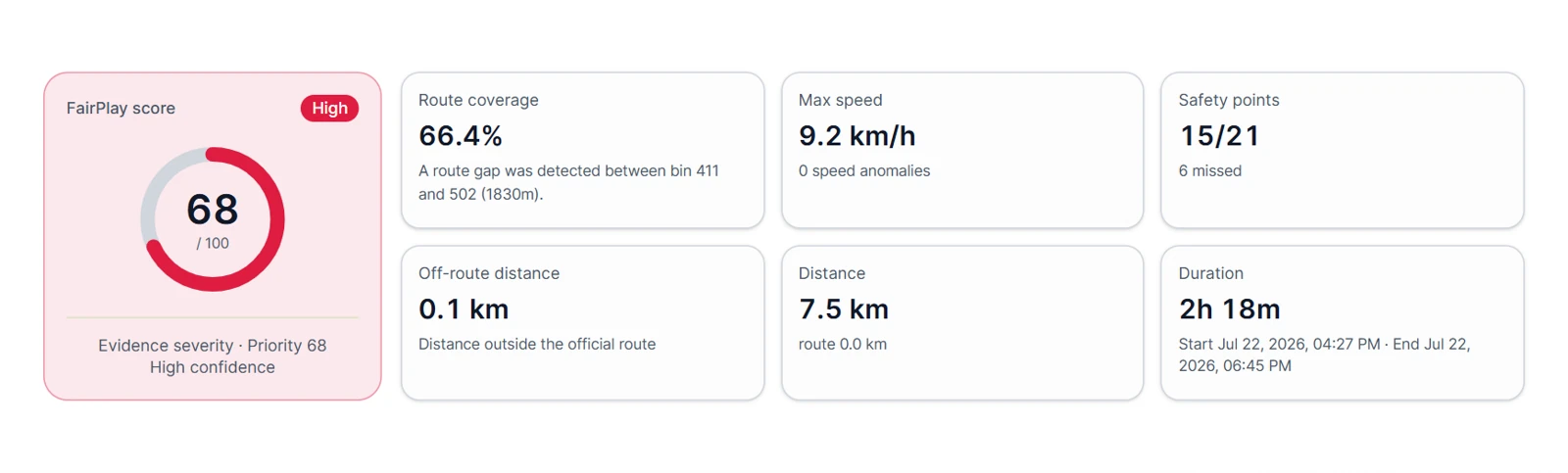
FairPlay compares recorded course data with verification checkpoints. Records can appear as verified or needing review, giving your team a clear queue for the final results check.
For your results team: FairPlay organises the evidence. Your organisers confirm the final result.
All tracking options appear in the same WayMe organiser view.


Navigation, alerts and live location updates every 2 seconds.
Best for most races.

GPS location only, with longer battery life and 2-minute update windows.
Available on request for ultra-long races or when carrying a phone is impractical.

Use the app for one participant group and dedicated trackers for another.

See how participants took part and how the event progressed.
Review flagged efforts and recorded course evidence with your team.

Use what you learn to refine participant preparation and your race-day setup.
Pricing for your race
Tell us about your field and tracking needs for a tailored quote.
Get in touch for a demo and quote.

Understand the setup, the data and the next steps.
Complete the short organiser registration form to create your account. WayMe reviews and confirms organiser accounts. Once approved, you can create your event and add its course and details.
Yes. Keep your established timing, registration, entry-fee and donation processes. Supply the confirmed participant list to WayMe through a table upload or an agreed API connection, then use WayMe tracking and FairPlay alongside your existing operation.
Optional manual finish-line timing which can replace official timing is available and recommended for races where only rarely multiple finishers cross the finishline near-simultaneously.
FairPlay compares recorded course data with verification checkpoints. It helps separate verified records from efforts that need review. Your organiser team considers the available evidence and makes the final decision on the result.
Available participant locations, off-track alerts and overtime alerts give your team more context. Use that information to guide further checks and assistance. Location availability depends on coverage and your tracking setup. Keep your event’s safety and response procedures in place.
Check expected coverage, tracking updates, battery needs and participant preparation for your actual course. Confirm the chosen device’s specifications and tracking conditions before planning a long event.
Yes. A race can use the WayMe app, dedicated GPS devices or a combination of both. The app is the simpler option when participants carry a phone; dedicated trackers may suit formats such as ultra-long races. Both can appear in the same WayMe organiser view.
Tracker availability, delivery, returns and rental costs depend on your event. Contact WayMe for a tailored quote before finalising the budget.
Keep your existing payment and donation providers. WayMe uses the confirmed participant list you supply for event access; this does not require replacing the way you collect entry fees or donations.
Yes. WayMe supports community and virtual challenges as well as physical races. Explore the Community organiser page for flexible start times, shared goals and virtual-event options.
From your next start line to the last runner.
Give your team more visibility, your supporters a way to follow and your results more course evidence.
Book a demoA few registration steps. Events become available after approval.
Your next steps
Complete the short organiser registration form.
We review and confirm your organiser account.
Add your course, event details and tracking setup.